From Render to Revenue: Build Quotes and Track Every Sale in RimFit
Attach an itemized parts quote to every render, then mark it Won or Lost to see your real close rate. How RimFit turns wheel previews into a sales pipeline.
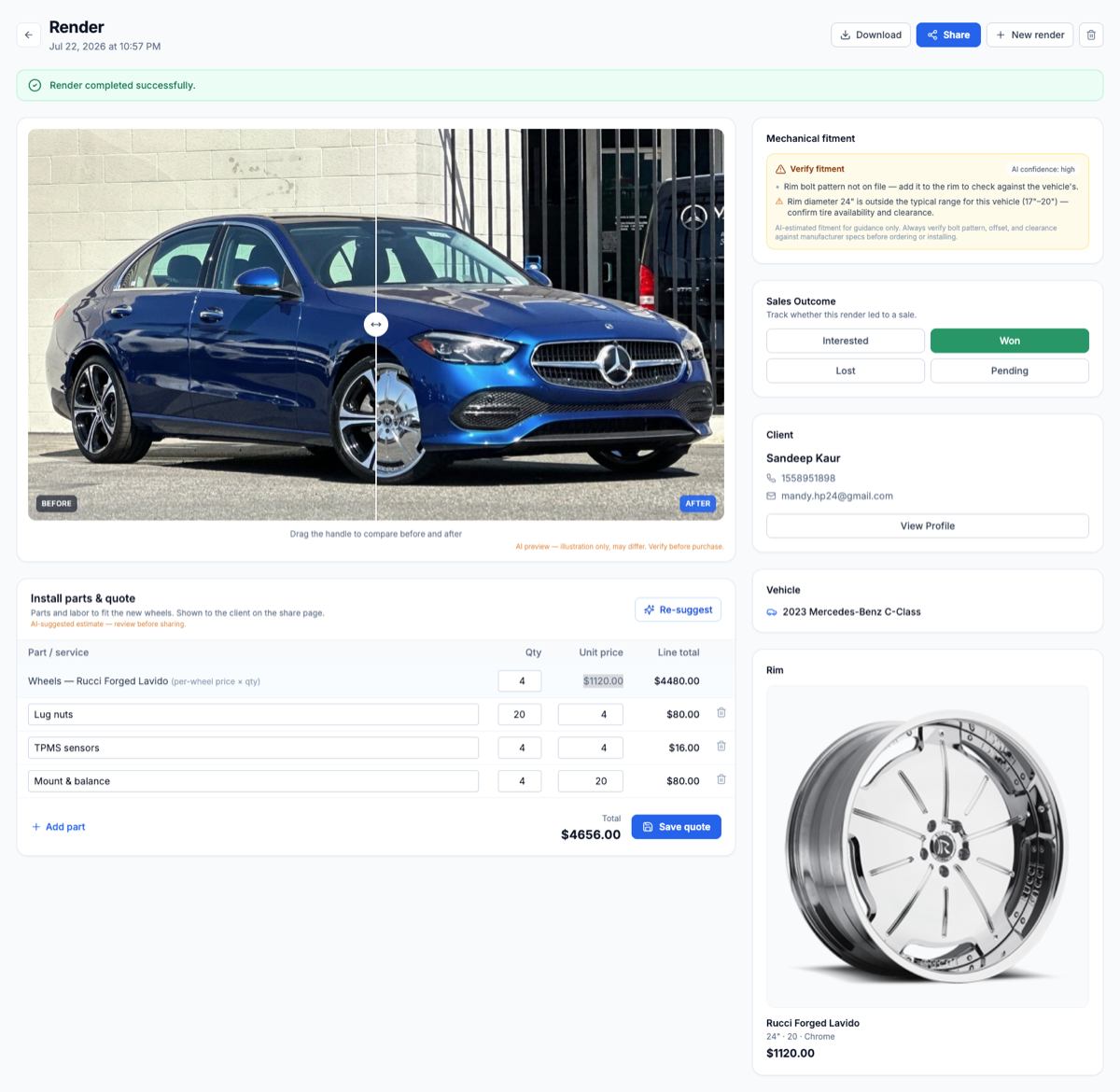
A good render gets a "wow" out of the customer. A "wow" doesn't pay for anything, though, and a week later it won't tell you why sales were up or down. Two less exciting things do that: a quote the customer can act on right away, and a record of whether they bought. RimFit puts both on the render page, and AI drafts the quote for you, so every preview ends up as either a sale or something you can learn from.
Attach an itemized quote while they're still looking
The best time to show the price is when the customer is looking at the wheels on their car and liking them. If you wait, that moment passes. Every RimFit render has an itemized quote right next to the image, so the customer sees the look and the price together.
The quote covers the whole job, line by line: the wheels at your price and quantity, the parts the install needs (tires, TPMS sensors, lug nuts, mount and balance), and a running total that adds up as you go.
Showing the full package works better than describing it. When the customer can see the upgrade on their own car next to an itemized price, stepping up to a nicer wheel or a full wheel-and-tire package feels like help rather than a hard sell. (More on that in visual selling and bigger tickets.)
See it on your customer's actual car
RimFit turns a photo of the car + any set of rims into a photoreal preview in seconds. Built for tire & wheel shops.
RimFit for shops →AI drafts the quote, you review it
You don't start from a blank quote. RimFit suggests the install parts and labor for you: the wheels at a per-wheel price, plus the lug nuts, TPMS sensors, and mount and balance a job like this usually needs, with quantities and prices filled in. If you want a different starting point, the Re-suggest button generates a new estimate.
It's a draft you check before sending, not a number that goes out on its own. The AI does the tedious part so nothing gets forgotten. You look it over, change a price or a quantity, and it's ready, fast enough to do while the customer is still standing there. It also means every salesperson quotes the full job the same way.
Your parts catalog sets the prices
The suggestions are only as good as the prices behind them, so quotes pull from a parts catalog you set up once. Add the parts you sell (tires, TPMS, valve stems, mount and balance, lug kits) with a default price for each. The estimate uses those numbers, and they're one tap away for anything you add by hand.
Pick a part and the price fills in. Change the quantity, add the wheels, and the total is done. What used to take a calculator now takes a few taps on a phone. You manage the catalog from your shop settings, so every quote your team builds uses the same current prices, and you don't end up with one salesperson quoting mount and balance at $20 and another at $40.
Check fitment before you quote
A quote for wheels that don't fit is worse than no quote, because it's a deposit you'll end up refunding. Beside the render, RimFit runs a mechanical fitment check and shows it with an AI confidence level. If something looks off, such as a bolt pattern that isn't on file yet or a rim diameter outside the vehicle's usual range, you get a plain-English warning before you build the quote. You catch it at the counter instead of in the install bay.
Treat it as guidance. The check is there to stop the obvious, expensive mistakes and remind you to confirm bolt pattern, offset and clearance against manufacturer specs before you order. With the visual and the check together, the customer knows the wheels look right and fit. (More in how fitment accuracy works and what a full fitment check covers.)
Then record whether it closed
Most tools stop at the quote. A render and a quote tell you what you offered, but not what happened. RimFit adds a Sales Outcome marker to every render with four options:
- Pending: quoted and waiting on the customer
- Interested: warm and worth a follow-up
- Won: they bought
- Lost: they didn't, and now you can see how often that happens
It's one tap per render, and it turns your renders into a sales ledger. You stop saying "I think we had a good month" and start knowing your close rate.
What outcome tracking shows you
Once renders are marked Won or Lost, things you could only guess at become visible. You get a real close rate. If it's low, work on the pitch or the follow-up; if it's high, put your effort into getting more leads in the door. Your Interested and Pending renders become a to-do list of warm leads. Over time you see which wheels and packages actually sell, which helps with stocking and pitching. And when you try a new approach, the Won and Lost numbers tell you whether it worked.
This is where the dashboard becomes a real sales pipeline, with leads coming in, quotes going out and outcomes recorded. (The lead-capture side is covered in how the dashboard tracks every customer.)
The whole loop
- Render the wheels on the customer's car so they don't have to wonder how it'll look.
- Glance at the fitment check before committing to anything.
- Let AI draft the parts and labor, adjust it, and show the look and the price together.
- Close the sale, or send the branded link so whoever's at home can see it too.
- Mark the outcome: Won, Lost, or a follow-up for tomorrow.
Do that on every wheel conversation and you're no longer running the shop on gut feel. You know what you offered, what you closed and what to do next, all from the screen where the customer first said "wow."
The render sells the look. The quote and the outcome tracker turn it into revenue you can measure. Pair them with an up-front fitment check so what you quote actually fits, see plans for shops, or bring RimFit to your shop floor.
Frequently asked questions
Can I build a wheel and tire quote inside RimFit?
Yes, and AI drafts it for you. Every render has an itemized quote next to the image. RimFit pre-fills it with the wheels plus the parts and labor a job usually needs (lug nuts, TPMS, mount and balance), using prices from your parts catalog, and keeps a running total. You review and adjust it, so the customer sees the look and the full package price together.
Does RimFit suggest the install parts automatically?
Yes. When a render completes, RimFit suggests an install parts and labor estimate: the wheels at a per-wheel price plus common items like lug nuts, TPMS sensors, and mount and balance. A Re-suggest button generates a new one. It's an estimate you review before sharing, which keeps anything from being forgotten and means every salesperson quotes the full job the same way.
Does the render page check whether the wheels fit?
Yes. Beside the render, RimFit runs a mechanical fitment check with an AI confidence level and flags problems in plain English, such as a bolt pattern that isn't on file or a rim diameter outside the vehicle's usual range, before you build the quote. It's meant to catch obvious mistakes early. Always confirm bolt pattern, offset and clearance against manufacturer specs before ordering.
What is a parts catalog and why does it speed up quoting?
It's a reusable list of the parts you sell (tires, TPMS, valve stems, mount and balance, lug kits), each with a default price you set once in your shop settings. Those prices feed the AI-suggested quote and fill in automatically for anything you add by hand. A full itemized quote takes a few taps, and prices stay the same across your whole team.
How does sales-outcome tracking work?
You mark each render Pending, Interested, Won or Lost with one tap. Your renders become a sales ledger, so you can see your real close rate, spot which warm leads to follow up on, and learn which wheels and packages actually sell.
Why should a wheel shop track close rate?
You can't improve what you don't measure. Marking each quoted render Won or Lost gives you a real close rate. If it's low, work on the pitch or follow-up. If it's high, focus on bringing in more leads.
Show customers their car — before they buy
RimFit is the AI wheel visualizer built for tire & wheel shops.
RimFit for shops →