Stop Losing Wheel Leads: How the RimFit Dashboard Tracks Every Customer
Most wheel shops lose leads to sticky notes and memory. The RimFit dashboard saves every lead and render, so your sales floor becomes a pipeline you can work.
Ask a wheel shop owner where their leads live and the answer is usually a notepad by the register, a few texts, and whatever the salesperson remembers. A customer walks in, loves a set of rims, says "let me think about it" and leaves. A week later nobody remembers the details. The sale wasn't lost because the customer changed their mind. It was lost because nobody followed up, and nobody followed up because nothing was written down.
The RimFit dashboard fixes that part. Every lead gets saved, every render is kept, and you can see which customers are close to buying.
Leads leak, and you don't see them go
There's no alarm when a "let me think about it" never comes back. You just do a bit less business than you could, month after month. The leaks are predictable:
- The walk-in with no record. A good conversation and real interest, but nothing written down, and they're gone by Friday.
- The verbal quote. You said a number out loud, they compared it with someone else's written one, and they never called back.
- "I'll show my wife." The person at home who has to agree never saw anything except a vague description.
- The busy Saturday. You talked to five good prospects, and by Monday you remember two.
Your team isn't slacking in any of these. The shop just doesn't have a system that remembers for them. (There's more on where sales disappear in why wheel shops lose sales.)
See it on your customer's actual car
RimFit turns a photo of the car + any set of rims into a photoreal preview in seconds. Built for tire & wheel shops.
RimFit for shops →How the dashboard captures leads
In RimFit, every render is a lead, and it's saved the moment it's created. When someone on your team photographs a customer's car and puts a set of wheels on it, that becomes a record tied to the customer. Nobody has to remember to log it, because making the preview is the logging.
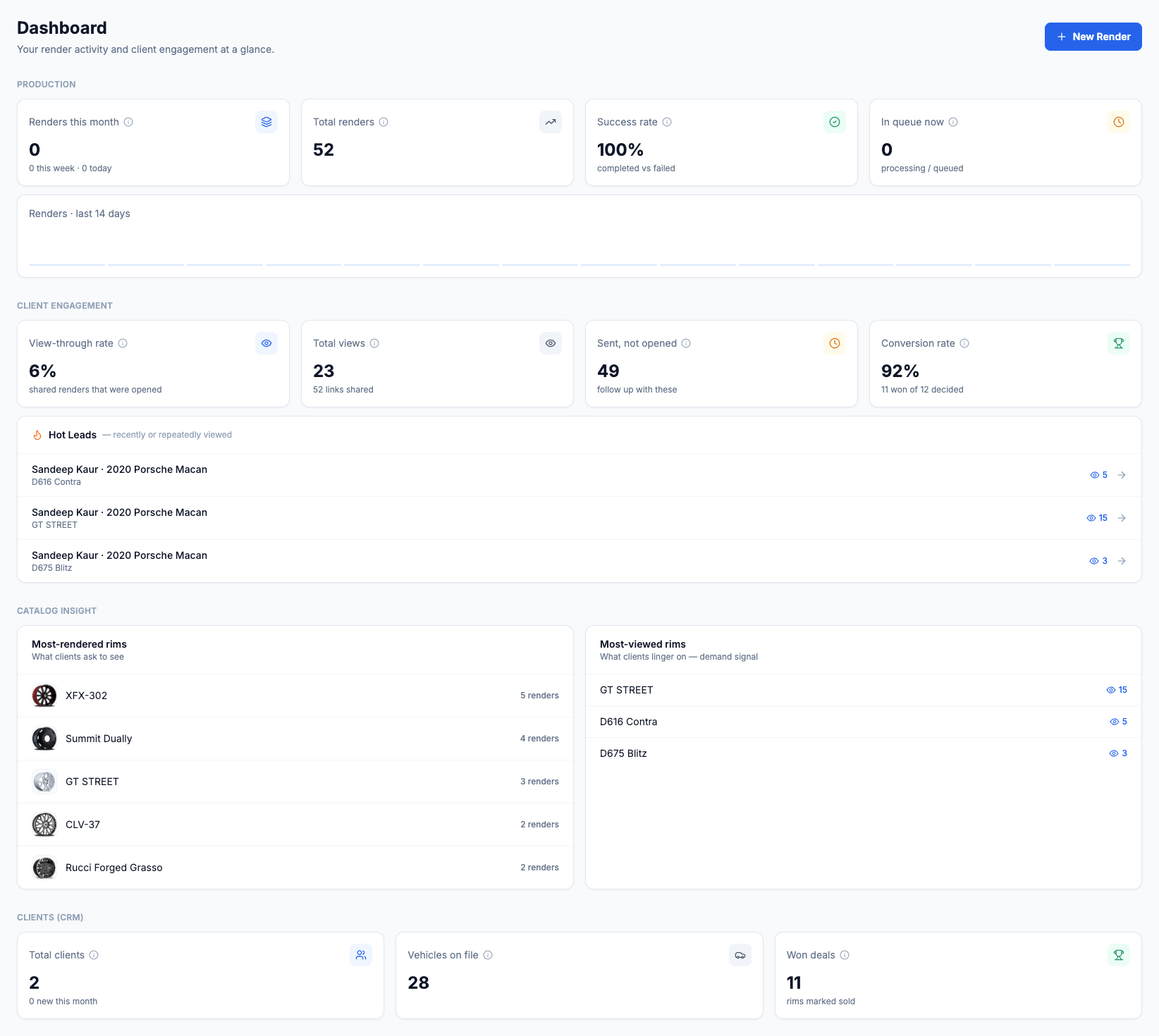
The dashboard sorts it into a few panels:
- Production shows renders this month, total renders, success rate and what's in the queue, so you can see how busy the team has been.
- Client engagement tracks shared renders. You see the view-through rate (how many shared previews got opened), total views, previews that were sent but not opened, and a conversion rate on leads that have been decided. The sent-but-not-opened count is your follow-up list.
- Hot Leads ranks customers who recently or repeatedly opened their render by view count. Someone who has opened their Porsche preview fifteen times is ready to talk, and this panel puts them at the top of your call list.
So instead of scanning a notepad, you open one screen and see who's interested, what they keep looking at, and who's worth a call today.
What a notepad can't tell you
A notepad stores names. It can't tell you which ones are warm. When a customer keeps reopening the link to their car wearing a particular set of rims, that's buying intent you'd never see otherwise. The sent-but-not-opened count works the other way round: it's a clean list of people who need a nudge.
Two more panels turn the same activity into merchandising information:
- Catalog Insight lists your most-rendered rims (what customers ask to see) and most-viewed rims (what they keep looking at). It's demand data from your own floor, which is a better guide to stocking and pitching than a hunch.
- Clients (CRM) shows total clients, vehicles on file and won deals, so customer relationships don't live in one salesperson's phone. Every car you've rendered is on file for the next visit.
Every render is saved and shareable
A render in RimFit isn't a throwaway image. It's a record of a sales conversation, and that helps in two ways.
First, follow-up takes one tap. A customer who left to think about it is still in your list, with the exact wheels they liked on their exact car. You pick the conversation up where it stopped instead of starting over.
Second, the customer leaves with something to show. Every render has a branded share link, so the person at home who has to sign off sees the real car with the real wheels, not a secondhand description. That does more for the "let me ask my spouse" objection than anything else we've found. (More on that moment in in-store techniques that close faster.)
From dashboard to closed sale
A pipeline you can see is one you can work. The loop looks like this:
- Capture. The render saves the lead while you show the wheels.
- Share. The customer leaves with a branded link to the exact look.
- Track. The lead sits in your dashboard instead of on a sticky note.
- Follow up. You reopen the render, see what they wanted, and finish the conversation while they're still interested.
Sales-outcome tracking picks up from here. You mark each render Interested, Won or Lost, which gives you your real close rate and tells you which follow-ups to make first. We cover that side of the dashboard in tracking quotes and sales outcomes.
Why it beats a notepad
Every interested customer becomes a record, so leads don't disappear with a lost note. Follow-up is faster because the customer, the car and the wheels they liked are all in one place. You can see how many leads you get and how many you close instead of guessing. And when a salesperson has the day off, their customers are still in the system.
You already do the hard part, which is getting customers into the shop and interested in wheels. The dashboard makes sure that work doesn't slip away between the counter and the follow-up call. See how visual selling drives bigger tickets, check plans for shops, or bring RimFit to your shop floor.
Frequently asked questions
How do wheel shops track leads from the sales floor?
The reliable way is a dashboard that records every customer interaction automatically, instead of relying on notepads or memory. In RimFit, each wheel render you create is saved as a lead tied to the customer and their car, so you have a visible list of people to follow up with.
Does RimFit save every render I create?
Yes. Every render is stored with the customer and vehicle and has a branded share link. You can reopen any past render in seconds, so a customer who left to think about it is still in your pipeline with the exact wheels they liked.
Can a wheel shop dashboard help with follow-up?
That's where it helps most. Because every interested customer is saved as a lead, follow-up is one tap away: you reopen the render, see what the customer wanted, and pick up the conversation while they're still interested.
Do I have to manually log every customer?
No. In RimFit, making the preview is the logging. The render becomes a saved lead as you work, with no separate data entry, which is why leads stop slipping away on a busy Saturday.
Show customers their car — before they buy
RimFit is the AI wheel visualizer built for tire & wheel shops.
RimFit for shops →